

The HubSpot connector for Perplexity integrates your HubSpot CRM with Perplexity, letting you search and retrieve information about your contacts, companies, deals, tickets, and other CRM records directly within a Perplexity session. Ask questions about your CRM data in natural language and get instant, structured answers without leaving Perplexity.
What does the HubSpot connector do?
The HubSpot connector gives Perplexity read-only access to your HubSpot CRM data. Once connected, you can ask natural-language questions and Perplexity will query your HubSpot account to retrieve the relevant records.
Supported CRM objects include:
-
Contacts — search and list people in your CRM
-
Companies — look up companies, domains, and associated details
-
Deals — check deal stages, amounts, and pipeline status
-
Tickets — review support tickets and their statuses
-
Products, Line Items, Quotes, and Invoices — query commerce-related records
Perplexity can read and search these records but cannot create, update, or delete any data in your HubSpot account. The connector is strictly read-only.
Who can use it?
The HubSpot connector is available to Perplexity Pro, Perplexity Max, Enterprise Pro and Enterprise Max users.
You’ll need a HubSpot account with access to the CRM objects you want to query.
Privacy and Data Security
Information Perplexity can view
When you connect HubSpot, Perplexity can view CRM records you have access to in your HubSpot portal, including:
-
Contact names, emails, phone numbers, job titles, and associated properties
-
Company names, domains, industry, and other company properties
-
Deal names, stages, amounts, close dates, and pipeline information
-
Ticket subjects, statuses, priorities, and descriptions
-
Other CRM object data (products, quotes, invoices, line items)
Information Perplexity cannot access
-
Perplexity cannot create, modify, or delete any records in your HubSpot account
-
Perplexity does not store your CRM data beyond what is needed to answer your query
-
Your HubSpot credentials are managed securely through OAuth and are never exposed to Perplexity directly
Disconnecting
You can disconnect the HubSpot connector at any time from your Perplexity settings. Disconnecting immediately revokes Perplexity's access to your HubSpot data.
How to activate the HubSpot connector
-
Start a new conversation on perplexity.ai.
-
Click the "+" button in the query bar to open the source selector.
-
Search for or select HubSpot from the list of available connectors.
-
You will be redirected to HubSpot to authorize the connection. Sign in to your HubSpot account and grant Perplexity access.
-
Once authorized, you will be returned to Perplexity. The HubSpot chip will appear in your query bar, confirming the connector is active.
Note: You need to select HubSpot or type
@hubspotto select the connector with your query.
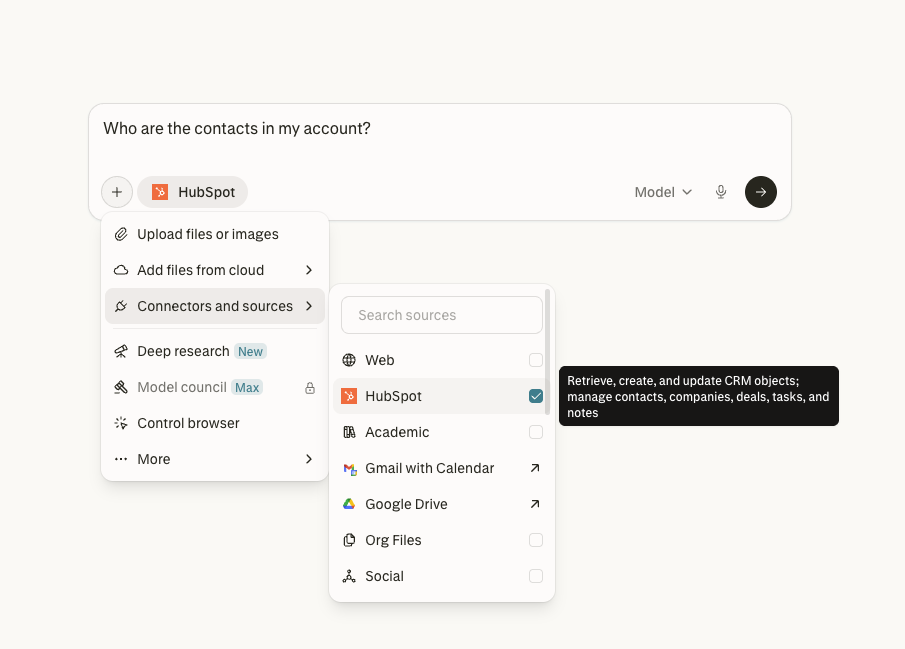
Note: If your HubSpot account requires admin approval for third-party app installations, you may need to contact your HubSpot admin before connecting.
Trying it out
Once connected, you can ask Perplexity questions about your HubSpot CRM data. Here are some examples to get started:
Look up your contacts
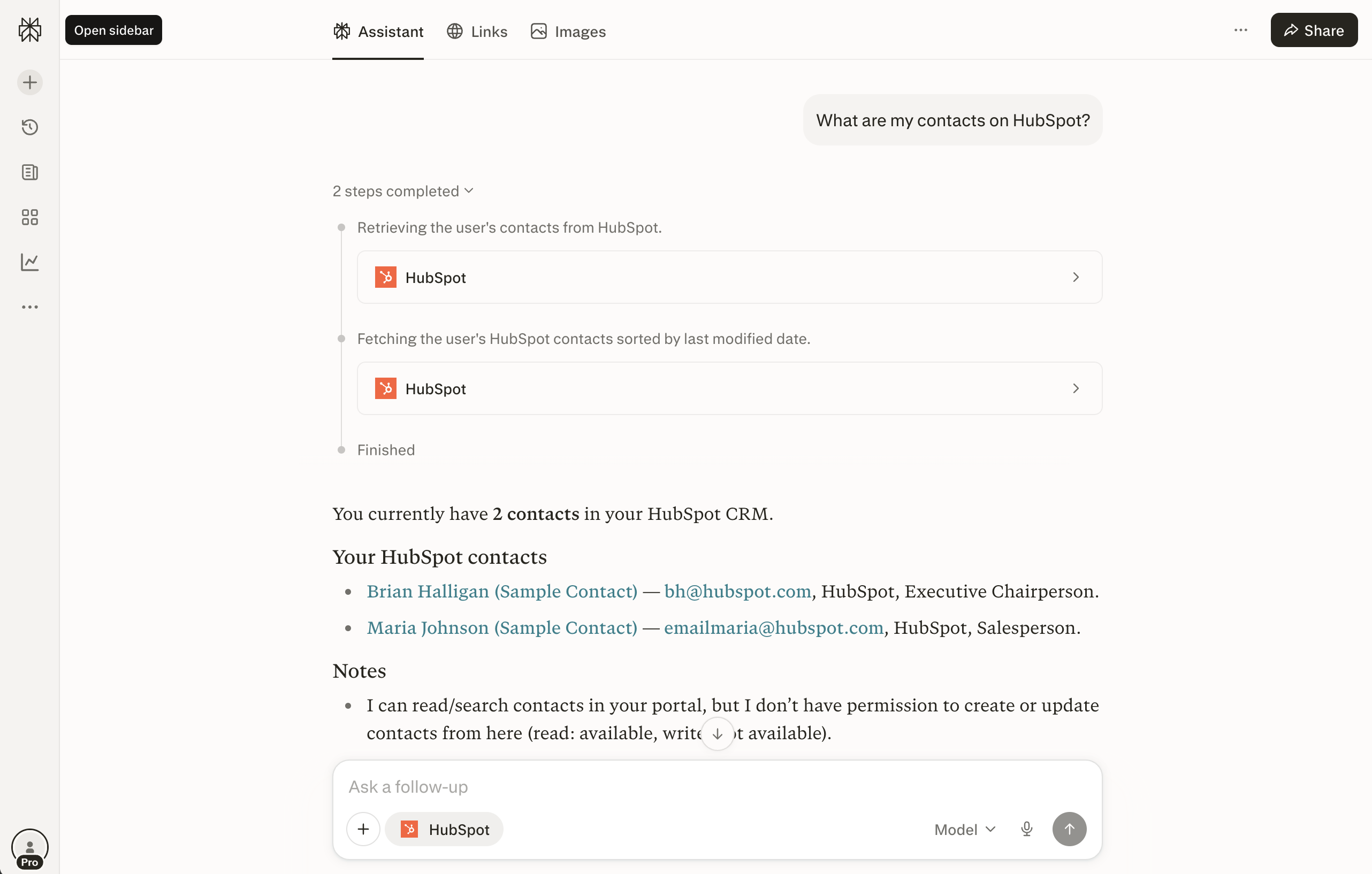
Select the HubSpot connector and type a query like:
"Who are my contacts on HubSpot?"
Perplexity will retrieve your contacts from HubSpot and display them with names, email addresses, companies, and job titles.
Browse your companies
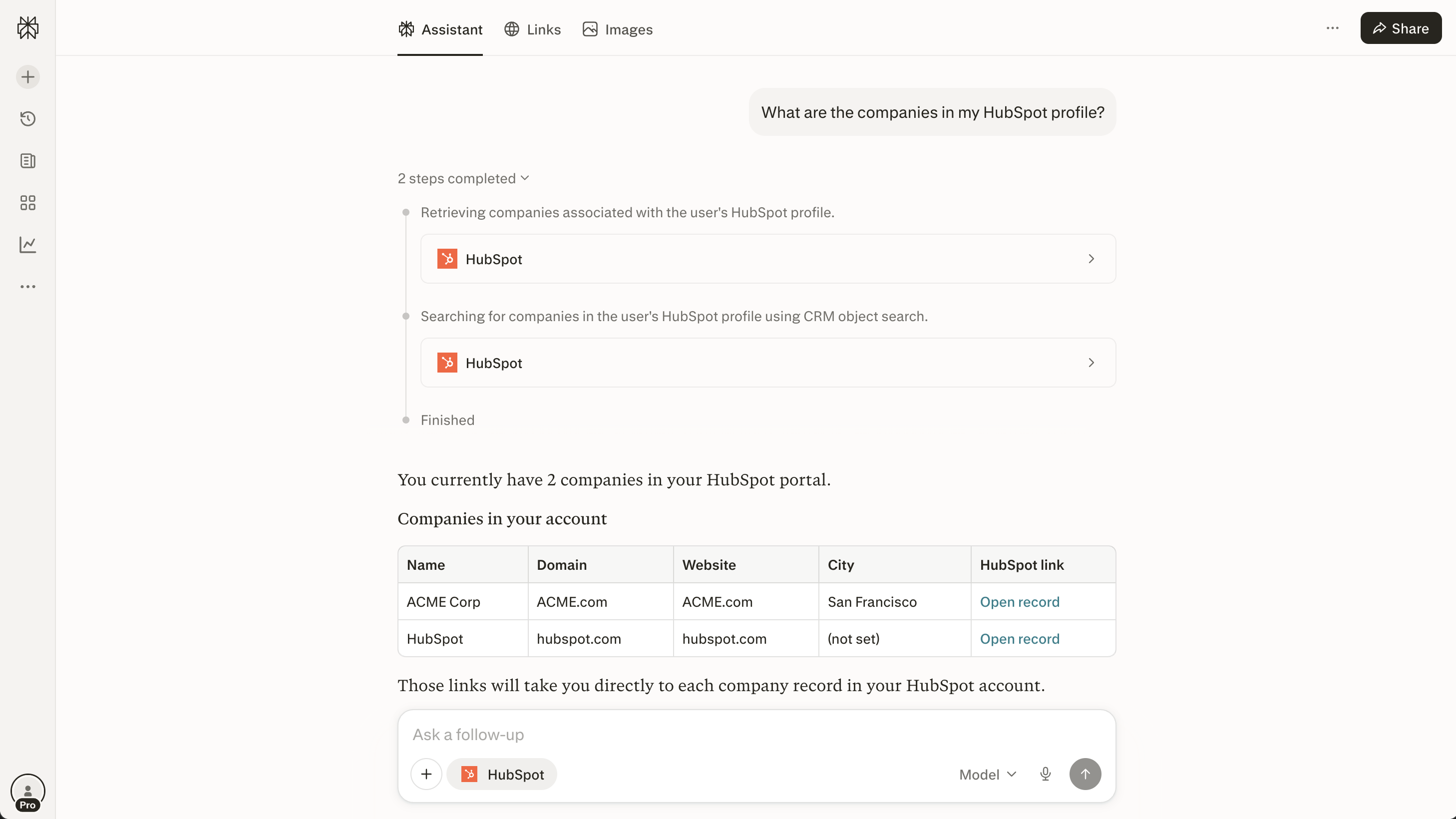
Try asking:
"What are the companies in my HubSpot profile?"
Perplexity will return a structured table of companies in your account, including names, domains, websites, and direct links back to each record in HubSpot.
More example queries
-
"Show me all open deals in my HubSpot pipeline"
-
"What tickets are currently open in HubSpot?"
-
"Who are the contacts at ACME Corp?"
-
"What is the status of the deal with [company name]?"
-
"List my HubSpot contacts sorted by last modified date"
How it works
When you submit a query with the HubSpot connector active, Perplexity takes multiple steps to answer your question:
-
Interprets your question and determines which HubSpot CRM objects to query.
-
Retrieves the relevant records from your HubSpot account (you may see progress indicators like "Retrieving the user's contacts from HubSpot" or "Searching for companies in the user's HubSpot profile using CRM object search").
-
Formats the results into a clear, readable answer — often as a bulleted list or table with links back to the original records in HubSpot.
Follow-up questions
After an initial query, the HubSpot connector stays active in the conversation thread. You can ask follow-up questions to drill deeper into your CRM data without re-connecting:
-
"Tell me more about Maria Johnson"
-
"Which of these companies are in San Francisco?"
-
"What deals are associated with ACME Corp?"
Frequently Asked Questions
Can Perplexity modify my HubSpot data?
No. The HubSpot connector is read-only. Perplexity can search and retrieve your CRM records but cannot create, update, or delete any data.
What HubSpot plans are supported?
The connector works with all HubSpot plans that provide CRM API access, including HubSpot Free, Starter, Professional, and Enterprise.
Why can't I see certain records?
Perplexity can only access records that your HubSpot user account has permission to view. If you have restricted permissions in HubSpot, those same restrictions apply when using the connector.
Is my data shared with other users?
No. The connector uses your personal HubSpot authentication. Only you can see your HubSpot data through Perplexity, and it is not shared with other Perplexity users or your team members unless they connect their own accounts.