

Credits power premium features like Computer and other frontier compute-intensive capabilities that expand your productivity.
Enterprise Pro users receive a monthly allocation of 500 credits, and Enterprise Max users receive 15,000 monthly credits, with additional credits available through your organisation's shared pool. These credits expire if unused, and do not roll over.
Credit pricing, task credit ranges, and included monthly allowances are subject to change and may vary by region, or plan.
Who Gets Credits?
If you're an Enterprise Pro member, you receive 500 credits included with your seat each month, and Enterprise Max users receive 15,000 monthly credits. Your organisation admin manages the overall credit pool and may set usage caps for your account.
To learn more about how your organization’s credit pool works, see: How Credits Work for Enterprise organizations — Admin Guide.
Credit access for Enterprise Pro users is coming soon.
What Are Credits Used For?
Credits are consumed when members use premium features that require significant computing power, such as Computer (Perplexity's agent that completes complex, multi-step tasks).
Perplexity Ask and standard searches do not require credits.
The specific number of credits consumed depends on the complexity and resources required for each task.
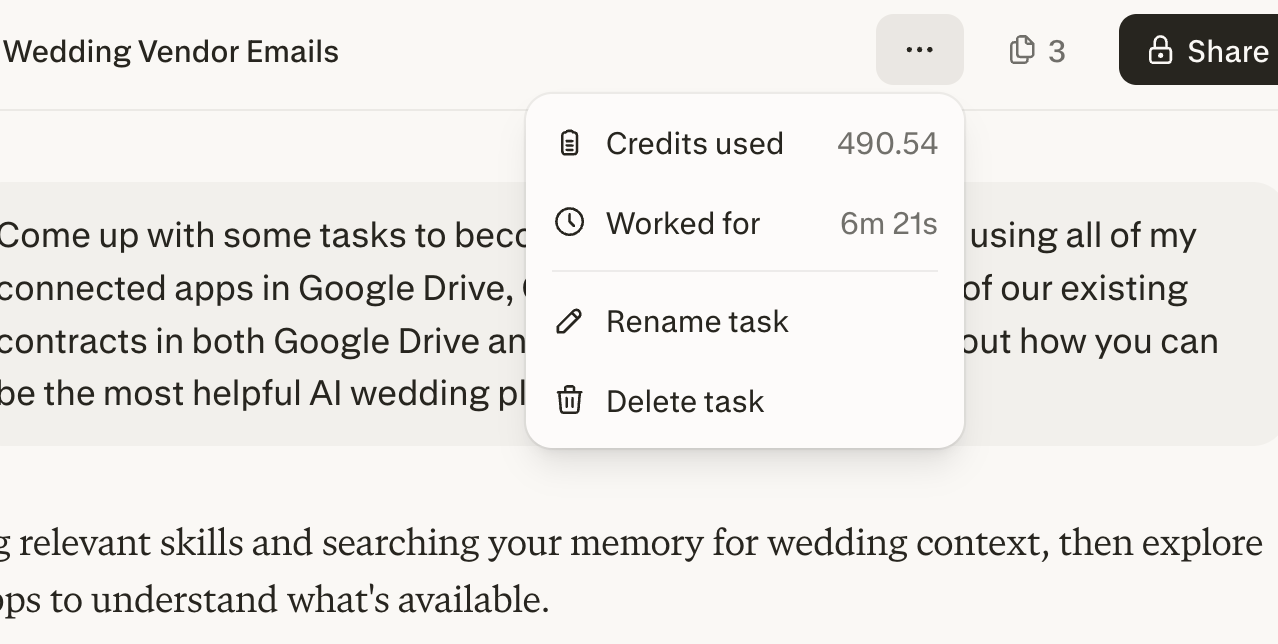
To check the exact credits used for a task, click the ellipsis (⋮) after running a Computer query
How Your Credits Work
Your Monthly Credit Grant
Each billing period, you receive a monthly credit grant as part of your Enterprise seat. These credits are yours to use for the month.
Important:
-
Credits refresh monthly based on your organization's billing cycle date.
-
Unused monthly credits do not roll over — they expire at the end of each cycle.
Additional Usage Limit
Once you've used your individual allocation, you may be able to draw from your organization's shared credit pool, depending on:
-
The usage cap set by your admin (per seat tier or individually).
-
Whether the organization pool has available credits.
You'll see your individual allocation and additional usage cap in your settings. Your admin manages the organization pool balance.
For more information on how admins allocate credits and set usage caps, see: How Credits Work for Enterprise organizations — Admin Guide.
How Credits Are Used
Credits are consumed in the following order:
-
Monthly credit grant (your individual allocation) — used first.
-
Additional usage cap (drawn from the organization pool) — used after your grant is exhausted, up to your individual or seat tier cap.
What Happens When You Run Out of Credits?
-
Active tasks pause — In-progress Computer tasks will pause, not cancel. Your progress is saved, and tasks will resume where they left off once credits are available.
-
New tasks are blocked — You won't be able to start new credit-consuming tasks until credits are available.
-
Tasks resume automatically — Once your monthly credits reset or your admin adds more credits to the organization pool, paused tasks will resume on their own.
If You Hit Your Usage Cap
When you use all your individual credits and exhaust reach your additional usage cap from the organization pool, you'll see this message:
"You've used your credit allocation. [Request more]"
Select Request more to ask your admin for a higher cap.
If the Organisation Pool Is Exhausted
If your organization's shared pool runs out of credits, you'll see:
"Your organisation has insufficient credits. [Request more]"
Your organization admin will be notified and can purchase additional credits.
Viewing Your Balance and Usage
Account Settings
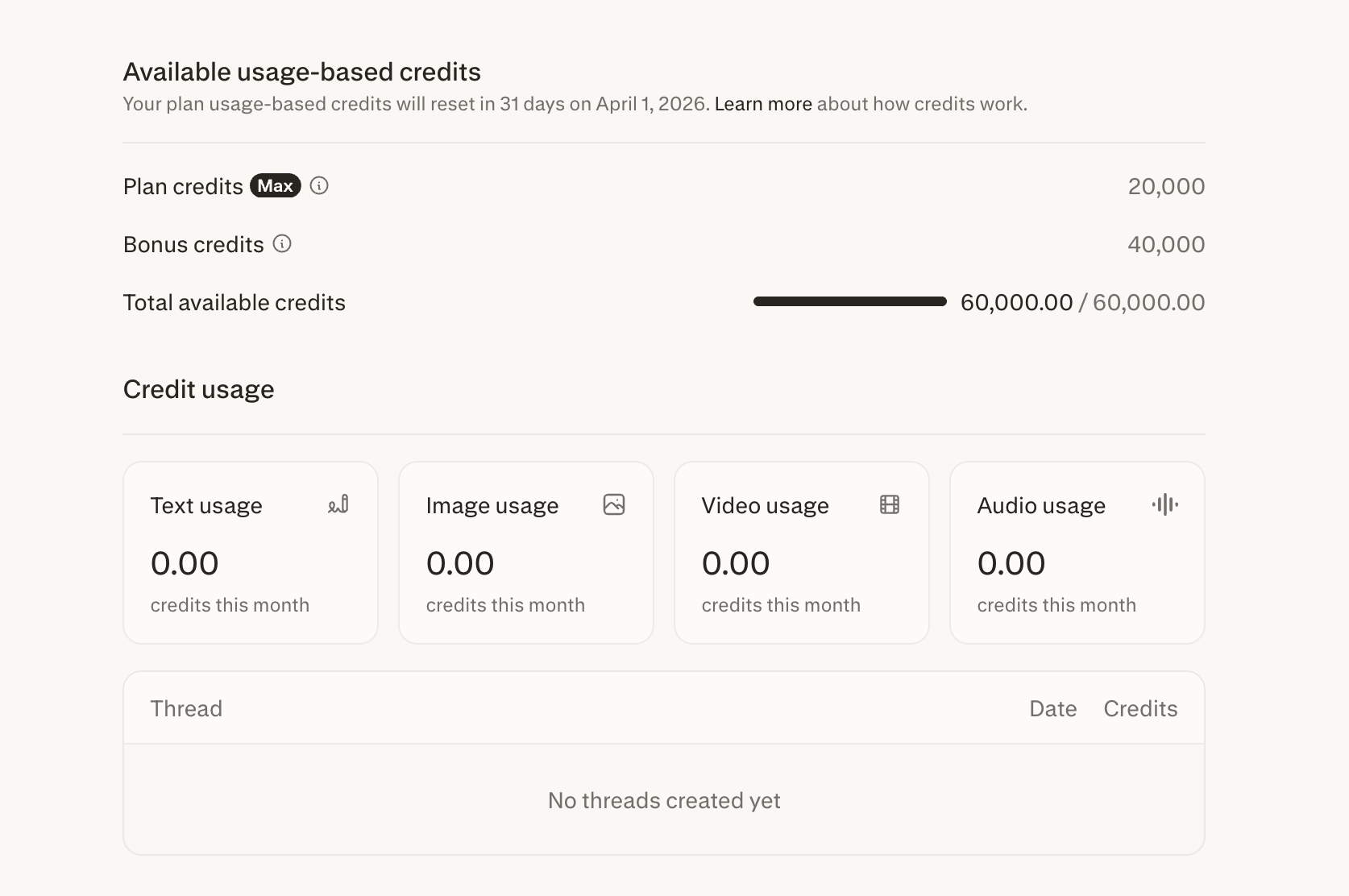
Go to Settings > Usage to view:
-
Your current individual credit balance (granted, used, and remaining)
-
Your additional usage limits (allocated, used, and remaining)
-
The date of your next monthly refresh
Per-Session Usage
Click the ellipsis (⋮) on any thread to see how many credits that task used.
In-Session Notifications
When you run credit-based tasks, you'll see:
-
The credit cost of your current task as it runs
-
A credits exhausted banner when you've used your full allocation—with an option to request more from your admin
Frequently Asked Questions
Do my monthly credits carry over?
No. Unused monthly credits expire at the end of each monthly refresh cycle, regardless of whether you are on a monthly or annual billing plan.
When do monthly credits refresh?
Monthly credits refresh based on your organization’s sign-up date. For example, if your organization started its plan on the 15th, credits will refresh on the 15th of each month. This applies to all plans, including annual subscriptions. Even though you’re billed once a year, your credit grant refreshes monthly across 12 cycles.
What happens to my credits if I leave the organization?
Credits don't transfer between organizations. If you leave, your individual credit pool becomes inaccessible and cannot be rolled over to a personal Perplexity subscription.
Can I transfer credits to another team member?
No. Credits are associated with your account and cannot be transferred to other users.
What does a negative balance on my account or task in Computer mean?
A negative balance means the task required more credits than were available in your account.
How do I fix or clear a negative balance?
As organization admin can clear organization members’ negative balances by funding the organization pool and/or increasing the seat usage limits for the seat tier of the affected members. More information here.
Will I be charged automatically to cover a negative balance?
As an individual member, you won’t be charged. We may invoice your organization for any negative balances accrued by all organization members at the end of the billing period.