

Before you start:
-
As the owner, you keep your threads and projects — they stay with your account. Members who leave or are removed lose access to work created in the organization's spaces. Ask them to save anything important first.
-
You must be both the administrator and the account owner of the Organization.
-
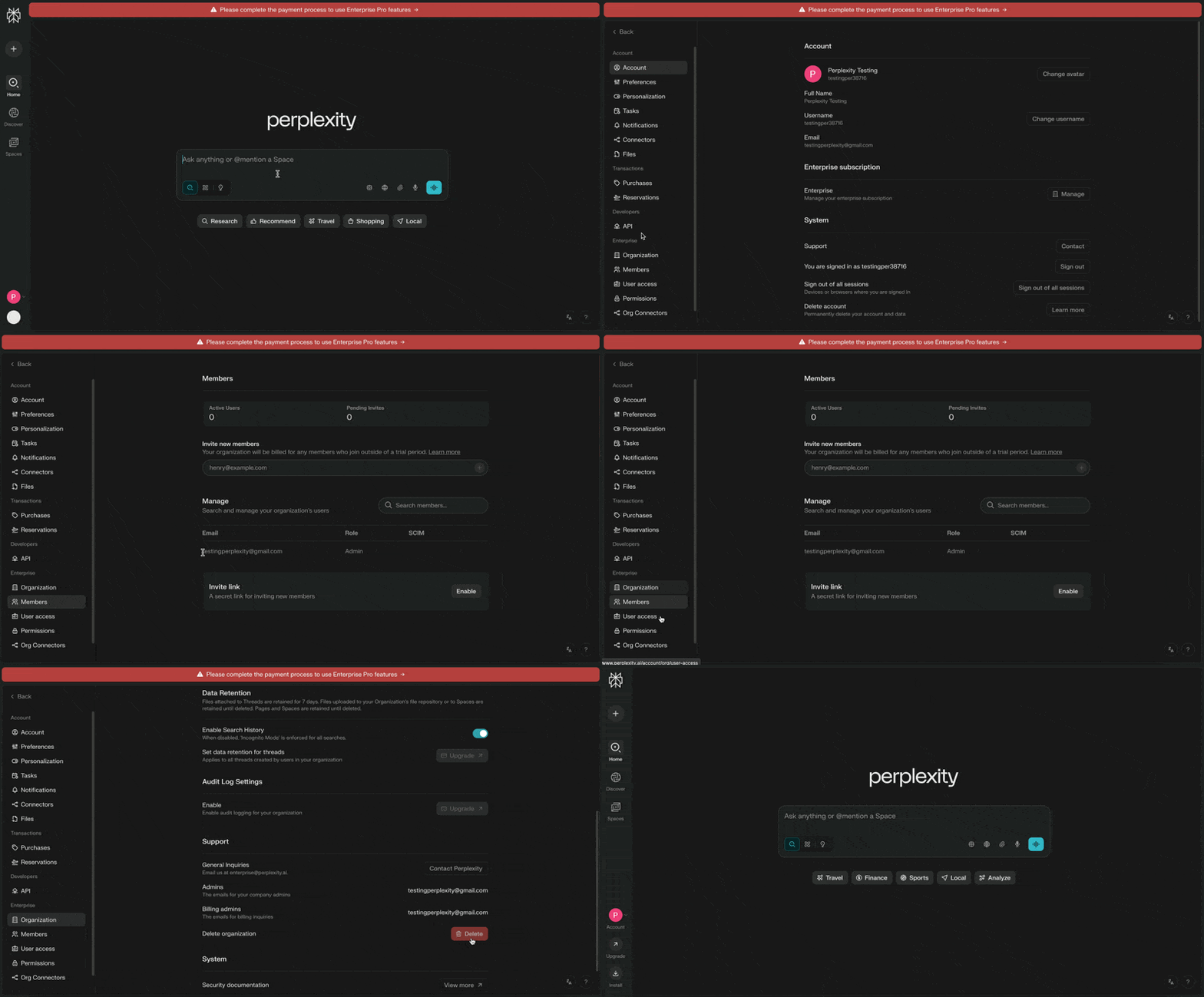
Make sure you don’t have an active Enterprise subscription. If you do, cancel it first.
-
Remove all members from your organization and delete any outstanding invitations.
Steps to delete your Enterprise organization:
-
Log in to Perplexity.ai on the web.
-
Go to All Settings (you’ll find this in your account menu at the bottom left).
-
Select Account.
-
Click on the Organization link in the sidebar.
-
Scroll down to the bottom of the Organization section.
-
Find and click Delete under Delete organization section.
-
Hit the Confirm you want to delete.
If you go through these steps but see a message telling you to contact Perplexity Support, give it 24 hours and try again. Sometimes it takes a little while for everything to update behind the scenes.