

The Gmail and Google Calendar Connector enables you to query email messages and calendar events directly from Perplexity.
It integrates Gmail and Google Calendar directly with Perplexity’s productivity features, streamlining your personal information management. It allows you to instantly discover and combine relevant information across your email, calendar, documents, connected apps, and the web, without exhaustive manual searches or context switching.
Below you’ll find an overview of this Connector and how to activate it.
What does the Gmail and Google Calendar Connector do?
Once enabled, the Gmail and Google Calendar Connector allows you to query your Gmail (and Google Workspace Mail) from Perplexity, enriching your searches with information that may only live in your inbox.
Currently, the Gmail and Google Calendar Connector can only query one primary calendar. Querying multiple or secondary calendars is not possible.
You can also query your calendar, allowing you to see your events or even update your calendar in a single interface.
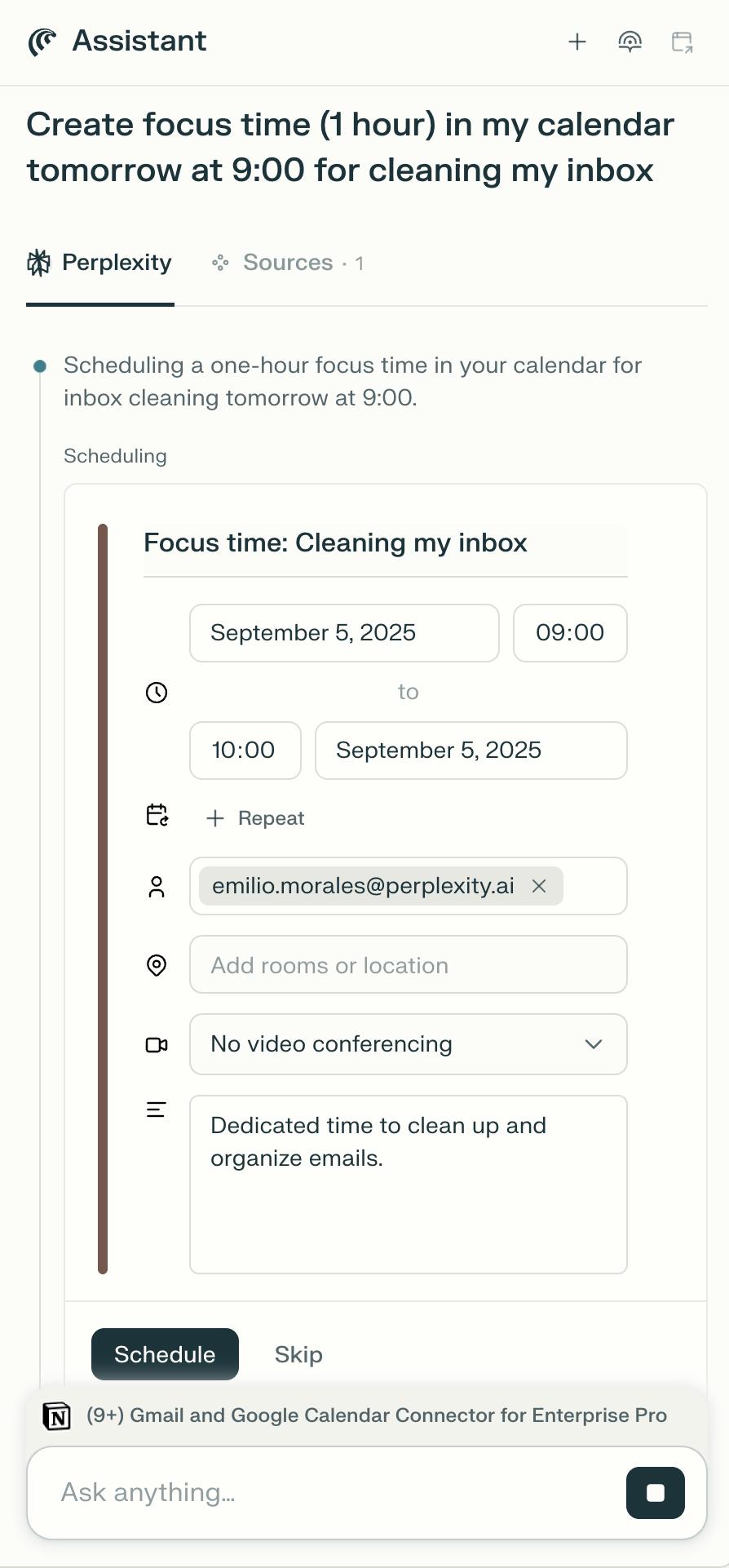
Additionally, if you use Comet, you can create events or send emails directly from the Assistant.
Privacy and Data Security
The Gmail and Google Calendar Connector requires the following permissions to function:
1. Contact Permissions:
-
Access to view and download contacts from "Other contacts"
-
Access to view and download your contacts
-
Access to view and download your organization's GSuite directory
2. Calendar Permissions:
-
View your subscribed Google calendars list
-
Add and remove Google calendar subscriptions
-
View and edit events on all your calendars
-
Access your calendar availability
-
View and download accessible calendars
3. Email Permissions:
-
Read, compose, and send emails from your Gmail account
Enterprise-grade Security and Control
For Enterprise organizations, we offer enterprise-grade protections and compliance including SOC 2 Type II certification, end-to-end encryption, strict data privacy measures, and granular user access controls. Your emails and calendar data, just like any other Enterprise data, are never used for AI training, and robust safeguards ensure confidentiality and regulatory compliance. You can learn more in our Trust Center.
Connecting Perplexity to your Gmail and Google Calendar account is done at a personal level. This means that no one else in your organization is able to query your inbox or calendar. If you query your calendar on a shared session, however, anyone with access to the session will be able to see the responses.
To maintain control over how Perplexity interacts with Gmail and Google Calendar, organization admins can enable or disable the connector for all organization users.
How to activate it
To activate the Gmail and Google Calendar Connector:
-
Go to Connectors in Settings and locate the Gmail with Calendar Connector on the list.
-
Click Enable.
-
You will then be prompted to log in to Google and to grant some permissions to the connector. These will allow the connector to have visibility of your inbox and calendar information and perform actions on your behalf in Gmail and Google Calendar. Click Allow to continue.
-
Click Finish setup to start using Perplexity with Gmail and Google Calendar.
If you’re a member of an Enterprise organization and can’t enable the Gmail and Google Calendar Connector on your account, an admin may have disabled it for your organization. Get in touch with an organization admin who will be able to confirm this.
If it’s enabled for your organization but you still experience issues, contact us.
Trying it out
Once you have connected Perplexity to Gmail and Google Calendar, try running some of these queries to leverage your inbox and calendar information and perform actions in directly from Perplexity:
-
Summarize the emails I received yesterday and prioritize the emails that need my attention
-
Who am I meeting with this week? Write bios
-
List urgent emails from this week
If you use Comet, you can also ask the Assistant to:
-
Create 1 hour of recurring focus time in my calendar, every Wednesday at 9am
-
Send an email to Perplexity Enterprise Support to inquire about custom Data Retention