

Please note that Email Assistant will soon be deprecated.
Email Assistant features aren't working?
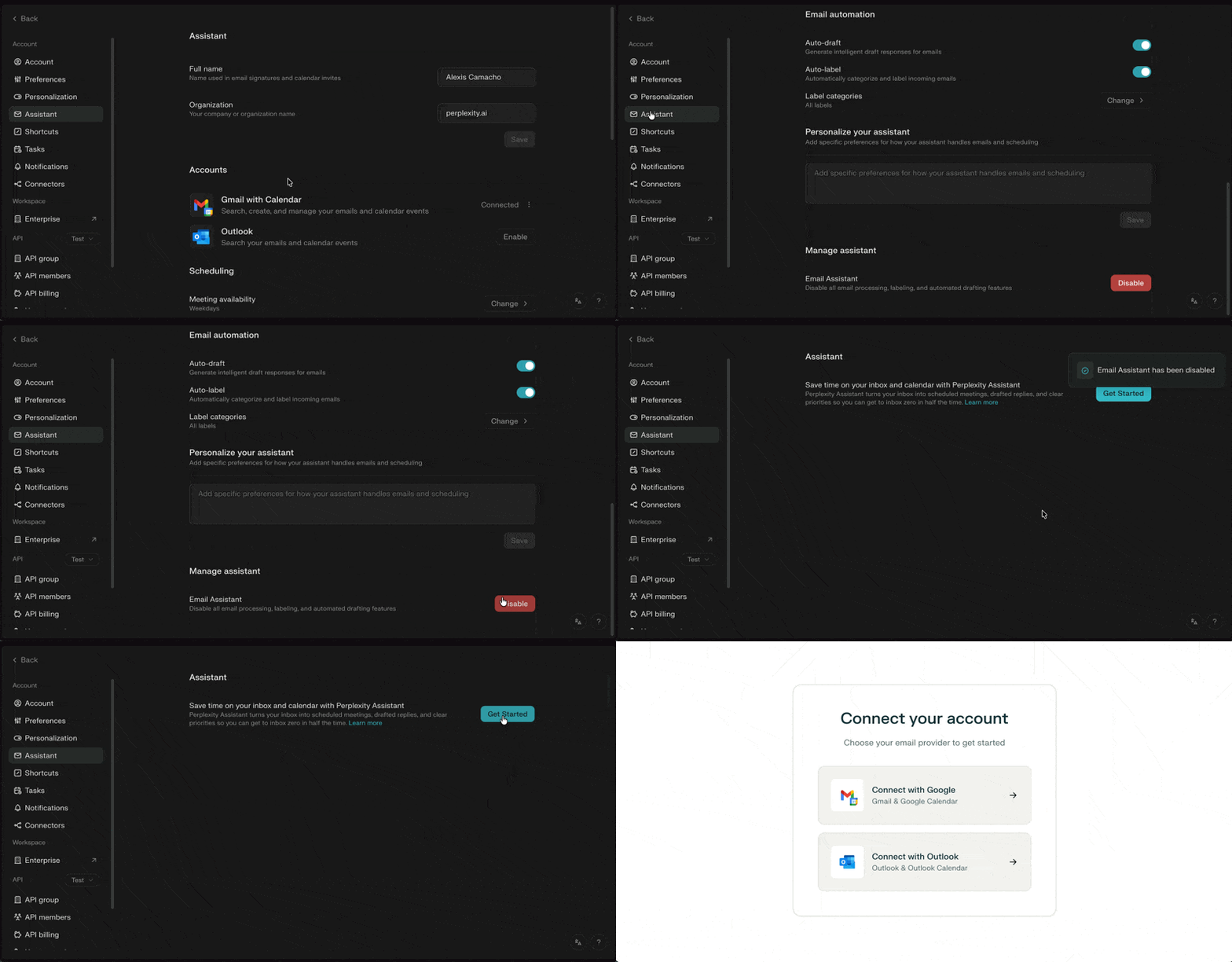
If the Email Assistant features aren’t working, try disconnecting and reconnecting through the Assistant settings. To reconnect, click “Disable” at the bottom of the page and go through the onboarding process again.
Connecting directly within each email account will not fully reconnect the assistant. Please use “Disable” to ensure a complete disconnection.
See below for more details:
Perplexity Assistant is not responding?
To keep your Assistant secure, we verify all emails using authentication checks to confirm that the email is really coming from you. If you are emailing Perplexity Assistant from a custom domain, please ensure that your domain's authentication records are configured correctly. You can learn more about this here.
Email Assistant doesn't work with emails that land in different folders in Outlook?
Email Assistant can currently only read and categorize emails in your Inbox, plus some messages in Sent; it does not access custom folders or follow Outlook rules that move emails out of the Inbox. As a workaround, you can pause or adjust rules that bypass the Inbox so emails land there first, then use Label Categories to tag and visually organize messages while keeping them in the Inbox for Email Assistant to process.