

With Memory for Enterprise organizations, individual users will get more personalized answers, with additional admin controls and data ownership safeguards.
For a general overview of how Memory works, see Memory.
What makes Memory different for Enterprise?
Enterprise Memory works the same way as Memory for individual users: Perplexity remembers preferences, interests, and information shared across conversations to deliver more relevant answers over time. The key differences are around admin controls, data ownership, and privacy and data handling safeguards.
Admin controls
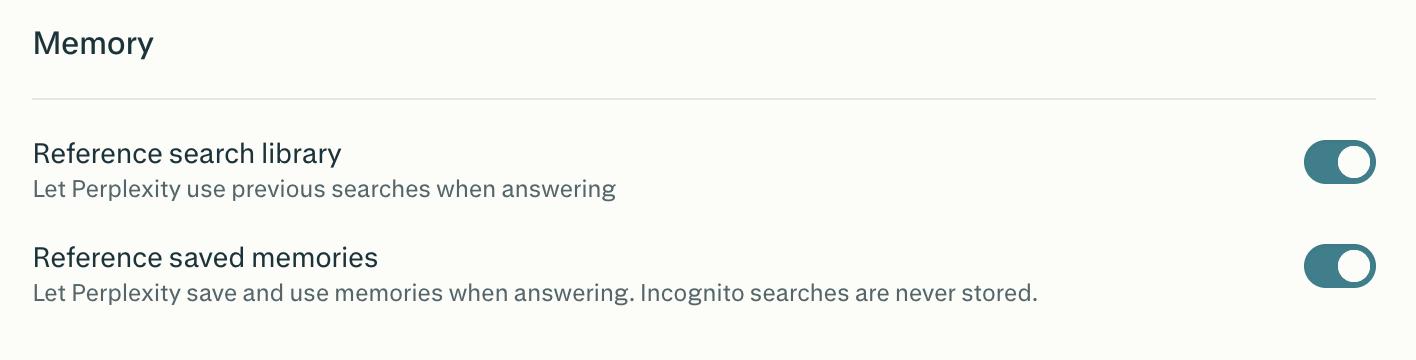
Organization admins can manage Memory feature permissions from the Permissions tab in the admin dashboard. Two settings are available:
-
Reference search library (shown as Use search history in user settings): lets Perplexity use previous searches when answering.
-
Reference saved memories (shown as Notes in user settings): lets Perplexity save and use memories when responding. When this feature is disabled at the organization level, all previously generated memories are deleted as of that date, and no new memories are created.
If an organization admin disables either setting at the organization level, it is also disabled for all users in the org. If an admin enables either setting, individual users can still choose to disable it on their own account.
Note: Memory and search history are always off when using Incognito mode, and questions asked in Incognito are never retained or used in memory.
Data ownership
Memories created within an Enterprise organization belong to the organization, not the individual user. If a user leaves the organization, they will no longer have access to the memories that were created while they were part of that organization.
Privacy and data handling
Memory for Enterprise organizations includes the following additional privacy safeguards to reduce retention of sensitive information like health details or financial data:
-
All memory data is encrypted.
-
We may retain a log of cleared memories for up to 30 days for the purposes of safety, debugging, and ensuring memories aren't re-created immediately after deletion.
-
Perplexity never uses memory content to improve models for Enterprise users. (AI Data Retention settings apply only to queries, not to whether memory content trains models — for Enterprise, memory is never used for training regardless.)
-
When organization admins disable Memory for the organization, all existing memories will be deleted. The same applies when an individual member disables Memory for their own account.
How Memory works in Projects
Memory is tied to your individual account. Inside a project, Perplexity can still record memories, but they're scoped to that Project — they don't flow into your global memory. Only Project-scoped memory and Project threads are used by default. To let a Project reference your personal sessions from outside it, open the Project, go to Manage Memory, and turn on Reference personal sessions in this project. Your personal sessions stay private — other project members can't see them.
Brain for Enterprise
Brain — Computer's self-improving memory system — is available in Research Preview to Enterprise Max users. It builds a private context graph from each user's own sessions, connected tools, files, and corrections to give Computer working context for their tasks.
Brain is built only from an individual user's own activity, is used only to improve that user's answers, and excludes Incognito sessions. As with all Enterprise memory, Brain content is never used to train models.
How Memory works
Perplexity may draw on two sources to personalize answers:
-
Memories: the preferences, interests, and information you share with us.
-
Search history: your past questions and answers that can help make a new response more relevant.
Perplexity calls on memory and previous searches depending on the question and whether using these sources informs a better response. As always, Perplexity cites any reference that determines the answer. You can toggle each independently in Settings → Memory.
Managing your memories
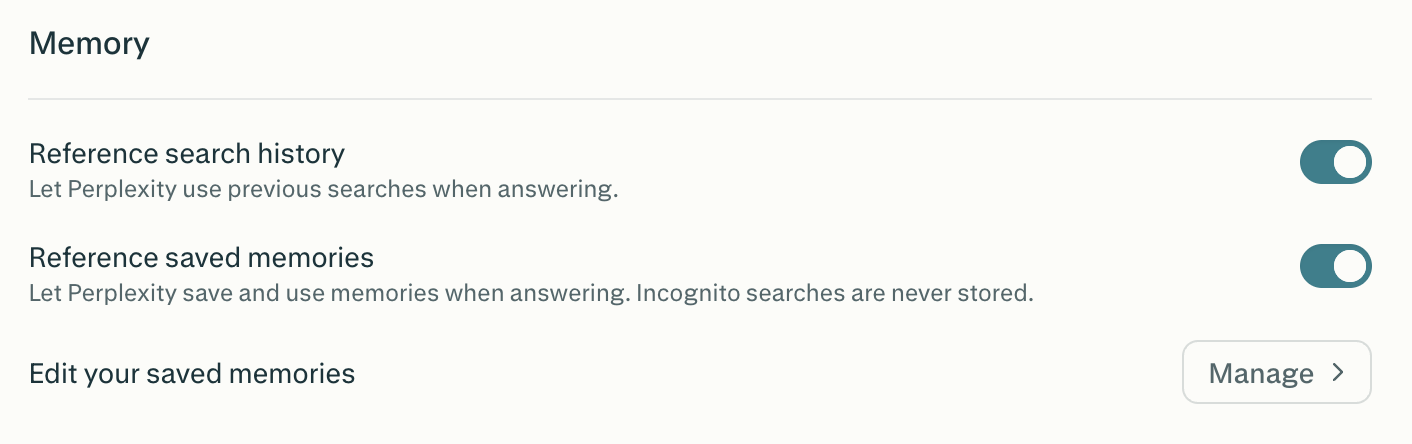
Individual users can view and manage all saved memories in Settings → Memory. You'll see:
-
Use search history — toggle for referencing past searches.
-
Notes — toggle for saving simple details from your sessions for future answers.
-
Manage memories — opens your full memory bank, where you can search, filter, and delete individual entries.
Each memory shows its date, category (such as Interests, Tools, Work, Preferences, Location, and more), and a summary of what was stored. You can search, edit, or delete individual memories, or use Delete all memories to clear everything at once.